Mobile App WikiMobileAppWiki
    Back to Apps
    FitCloudPro icon

    FitCloudPro

    FitCloudPro connects Kumi smartwatches to your phone, offering health data tracking, rich notifications, and watch customization. Monitor well-being today!

    health
    3.7
    10M+
    Android
    Free
    Honest Take

    + The app generally connects well and integrates with Google Fit and insurance apps, offering good smartwatch functionality for its price.

    Users frequently report unencrypted data transfer, privacy concerns, inaccurate health data (especially BP), and unreliable automatic syncing of health data.

    This page contains affiliate links. Learn more

    Screenshots

    FitCloudPro screenshot 1
    FitCloudPro screenshot 2
    FitCloudPro screenshot 3
    FitCloudPro screenshot 4

    Swipe to view more screenshots

    About FitCloudPro

    Overview

    FitCloudPro emerges as a pivotal health application designed to bridge the gap between Kumi smartwatches and mobile devices, offering users a centralized hub for managing their wearable technology and personal health data. In an increasingly health-conscious world, the app addresses the growing need for seamless integration between fitness trackers and smartphones, simplifying the monitoring of vital health metrics and enhancing smartwatch functionality. While not a standalone health tracker, FitCloudPro's strength lies in its ability to consolidate data from compatible Kumi smartwatches, providing an accessible dashboard for users to review their daily activity, sleep patterns, and cardiac health.

    The application serves as an essential companion for Kumi smartwatch owners, extending the utility of their wearable devices beyond mere timekeeping. It facilitates customized watch experiences, enables timely notifications, and incorporates behavioral reminders crucial for maintaining a healthy lifestyle. By channeling real-time data from the watch to the phone, FitCloudPro empowers individuals to gain deeper insights into their well-being, fostering a proactive approach to personal health management. Its existence underscores the current trend towards interconnected ecosystems for personal electronics, aiming to offer a cohesive and user-friendly experience.

    Key Features

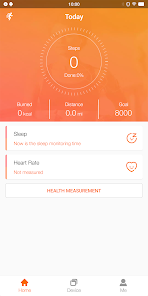
    • Comprehensive Health Data Monitoring: Users can track and review essential health metrics including step counts, calorie expenditure, sleep duration and quality, real-time heart rate, and blood oxygen levels, providing a holistic view of daily physical activity and physiological states.
    • Rich Message Reminders: The app ensures users stay connected by relaying notifications from smartphone applications directly to their smartwatch. This includes incoming calls, SMS messages, and alerts from popular social media platforms like Facebook and Twitter, minimizing the need to constantly check the phone.
    • Customizable Watch Dials: FitCloudPro offers a diverse selection of watch faces, allowing users to personalize their smartwatch's appearance to match their style, mood, or occasion, enhancing the aesthetic appeal and user experience of the device.
    • Sedentary Reminders: To combat prolonged periods of inactivity, the app can be configured to prompt users to move after a set duration, integrating gentle nudges into their daily routine to promote a more active lifestyle.
    • Drinking Water Reminders: Emphasizing hydration, this feature allows users to set regular reminders to drink water throughout the day, supporting overall health and well-being.
    • Kumi Smartwatch Compatibility: The application is specifically designed to support various Kumi smartwatch models, including the GT6 Pro, GW16T Pro, KU3 Max, and KU3 Meta, ensuring optimized performance and feature integration for these devices.

    How It Works

    Upon installation, users initiate the setup process by pairing their compatible Kumi smartwatch with the FitCloudPro application via Bluetooth. This initial handshake establishes the crucial link for data synchronization and control. Once connected, the app immediately begins receiving health and activity data from the smartwatch, populating interactive dashboards within the mobile interface.

    The core interaction loop involves the smartwatch continuously collecting data, which is then transmitted to the FitCloudPro app at regular intervals or upon user request. Users navigate through various sections of the app to view their health summaries, customize notification settings, or select new watch dials. The intuitive layout groups related information, such as daily activity logs, sleep analysis, and cardiovascular metrics, making it easy to track progress and identify trends over time. The app also allows users to configure the aforementioned sedentary and hydration reminders directly from their phone, which are then pushed to the smartwatch for timely alerts.

    Who It's For

    FitCloudPro is primarily designed for owners of Kumi smartwatches who seek a consolidated and user-friendly platform to manage their device's functions and health tracking capabilities. The ideal user is someone interested in monitoring basic health metrics like steps, calories, sleep, and heart rate without requiring advanced medical-grade analysis. Individuals who appreciate customizable wearable aesthetics and desire seamless message notifications directly on their wrist will find this app particularly beneficial. It caters to those looking for a practical, everyday health companion that integrates easily with their existing Kumi smartwatch.

    This application is best suited for individuals focusing on general wellness and fitness rather than professional athletic training or clinical health monitoring. Those requiring extensive, in-depth data analysis, specialized workout tracking, or compatibility with a wider range of non-Kumi smartwatches might find the app's offerings somewhat limited. It serves well for casual health tracking and enhancing the utility of specific Kumi wearables.

    Pros and Cons

    Pros:

    • Provides a centralized hub for multiple health metrics from Kumi smartwatches.
    • Offers extensive customization options for watch dials.
    • Effectively relays a variety of smartphone notifications to the wrist.
    • Includes useful health reminders for hydration and activity.

    Cons:

    • Limited to specific Kumi smartwatch models.
    • Not a standalone health tracking solution; requires a compatible smartwatch.
    • Lacks advanced features for professional fitness tracking or in-depth analytics.

    Key Features

    Monitor and record health data (steps, calories, sleep, heart rate, blood oxygen)
    Receive rich message reminders (calls, SMS, Facebook, Twitter)
    Choose from various watch dials to match your style
    Set sedentary and drinking water reminders
    Support for Kumi smartwatches like GT6 Pro, GW16T Pro, KU3 Max, KU3 Meta

    Similar Apps

    Hidden Gem
    LightMyWatts icon

    LightMyWatts

    LightMyWatts – Transform Your Training Into an Immersive Light Experience! LightMyWatts isn’t just another training app – it’s a game-changer for indoor training. Imagine turning every pedal stroke or step into a visual masterpiece. With LightMyWatts, your effort doesn’t just show on a screen – it lights up your entire room. How does it work? Every watt you push and every heart beat instantly syncs with your Philips Hue lights, creating a dynamic color experience that mirrors your performance. Cruise in Zone 2 and enjoy a calming blue glow that keeps you steady. Ramp up to Zone 6, and watch your space ignite in fiery reds as you sprint toward your limits. It’s motivation you can see and feel. New Feature: Heart Rate Lighting Mode No spare BLE channel? No power meter available? Running on a treadmill? LightMyWatts now lets you use your heart rate strap to drive the light colors! Your heart rate zones become a vibrant visual guide – perfect for athletes who want the same immersive experience even without power data, or simply prefer training by HR. Whether you’re cycling, running, or doing a workout on the go, your pulse becomes your palette. Why LightMyWatts? Immersive Training: Your power or heart rate zones become a living light show. Personalized Experience: Configure your Hue bridge and group settings easily. Instant Feedback: No charts, no numbers – just pure visual energy. Whether you’re chasing watts, building endurance, or crushing intervals, LightMyWatts turns your training into an unforgettable sensory experience. It’s not just cycling – it’s performance art. Ready to ride in color? Download LightMyWatts today and make every watt – or heartbeat – shine! To use LightMyWatts alongside a training platform like Zwift, Rouvy, or MyWhoosh, your trainer (e.g., Wahoo) must support an extra Bluetooth channel. Alternatively, you can connect using a power meter or power pedals on your bike — or now, simply use your heart rate strap. You’ll also need a Phi

    Immersive
    Dynamic
    Sensory
    health
    5
    Freemium
    Hidden Gem
    PLNK Fitness icon

    PLNK Fitness

    ## Overview PLNK Fitness is the official mobile application for the popular fitness studio, PLNK Fitness, specializing in Lagree workouts on Megaformer machines. Designed to streamline the user experience, this app serves as a comprehensive portal for individuals dedicated to their fitness journey with PLNK. It eliminates the need for navigating complex websites on mobile, bringing all essential functionalities directly to the user's fingertips. From browsing class schedules to managing memberships, the app centralizes key activities, ensuring a seamless and efficient interaction for fitness enthusiasts. The core utility of the PLNK Fitness app lies in its ability to connect users quickly and effortlessly with their preferred Lagree classes. With hundreds of classes offered weekly, the app acts as a digital concierge, allowing users to discover, book, and purchase sessions with unparalleled ease. Beyond class management, it provides vital information about studio locations, ensuring users can find their nearest PLNK Fitness center without hassle. The platform also serves as a communication hub, keeping users updated on the latest news, in-studio events, and exclusive offers, fostering a stronger community connection. ## Key Features - **Effortless Class Booking**: Quickly find and reserve your spot in Lagree classes across all PLNK Fitness locations. - **Direct Class Purchase**: Conveniently buy single classes or class packages directly within the app. - **Studio Locator**: Easily view studio addresses, contact information, and operating hours for all PLNK Fitness sites. - **Real-time Schedule Access**: Access up-to-date class schedules, including instructor details and class descriptions. - **Account & Membership Management**: Oversee your personal profile, review purchase history, and manage active memberships. - **Exclusive Updates**: Stay informed about the latest PLNK Fitness news, special events, and app-exclusive offers. ## Who It's For The PLNK Fitness app is designed for existing and prospective clients of PLNK Fitness studios. It caters to individuals committed to Lagree workouts on the Megaformer, who seek a convenient, all-in-one platform for managing their fitness regimen. It's ideal for busy individuals who want to quickly book classes, track their progress, and stay connected with the PLNK Fitness community. Whether you're a seasoned Lagree practitioner or new to the PLNK experience, this app streamlines your fitness journey.

    Frustrating
    Intense
    Demanding
    health
    5
    Free
    Hidden Gem
    btone fitness NEW icon

    btone fitness NEW

    ## Overview btone fitness NEW is a dedicated mobile application designed to streamline the experience for users of btone FITNESS studios. At its core, the app serves as a centralized hub for managing all aspects of a user's fitness journey with btone, from initial class discovery to ongoing membership oversight. It eliminates the need for navigating complex websites or engaging in phone calls, offering a convenient, on-the-go solution for busy individuals looking to incorporate btone's unique fitness classes into their routines. The primary function of btone fitness NEW is to facilitate planning and scheduling. Users can easily browse the complete class schedule, filter by criteria such as time, instructor, or class type, and secure their spot in a preferred session with just a few taps. Beyond scheduling, the app enhances the user experience by providing transparency into account details, including current class tallies and comprehensive membership information, ensuring users are always informed about their progress and subscription status. Furthermore, the app acts as a direct communication channel for promotions and special offerings. Users can discover and take advantage of ongoing deals, potentially saving money and encouraging greater engagement with the btone FITNESS community. By consolidating essential functionalities into a single, intuitive platform, btone fitness NEW aims to deliver a seamless and efficient service that complements the energetic and results-driven nature of btone's fitness programs, ultimately saving users valuable time. ## Key Features - **Class Schedules**: View real-time class schedules across all btone FITNESS locations. - **Class Sign-Up**: Directly sign up and reserve spots in desired fitness classes. - **Promotions & Offerings**: Discover and access ongoing promotions, discounts, and special packages. - **Class Tally**: Track the total number of classes attended to monitor progress. - **Membership Details**: Access comprehensive information about current memberships, including expiration dates and benefits. - **Account Management**: Manage personal profile and account settings within the app. ## Who It's For btone fitness NEW is ideal for existing members of btone FITNESS studios who seek a convenient, quick, and efficient way to manage their class schedules and membership details. It also caters to prospective clients interested in exploring btone's offerings, viewing class availability, and easily signing up for their first session. Individuals with active lifestyles who prioritize time-saving tools and on-the-go management of their fitness commitments will find this app particularly useful.

    Community-focused
    Streamlined
    Supportive
    health
    5
    Free
    Hidden Gem
    PowNap icon

    PowNap

    PowNap Wake up when your body is ready. PowNap is an intelligent power-nap timer for Apple Watch. Instead of rigid time rules, PowNap uses your heart rate to detect recovery and wake you at the right moment. You start the nap. PowNap handles detection and wake-up — based on your current physiology. --- Two Modes Power Nap 15, 20, or 25 minutes. - May end earlier if your body recovers sooner - Ends at the selected time at the latest Heart-rate detection with a fixed upper limit. Infinity Nap No time limit. - Ends when your body shows signs of recovery or light sleep - Ideal for stress, exhaustion, or when you don’t want a fixed duration Not designed for deep sleep, but for short, measurable recovery. Depending on your heart rate, this may happen after 10–15 minutes — or later. --- Calm. Precise. Distraction-free. - Detects relaxation and falling asleep via heart rate - Wakes you with gentle vibration - No countdown pressure, no unnecessary sound - Subtle progress indicators instead of a classic timer - Runs fully offline on your Apple Watch Tap “Start” — PowNap takes care of the rest. --- Adjustable (Optional) - Vibration: Soft, Medium, Strong, or Increasing - Heart-rate threshold: - automatically adjusted to your resting heart rate - or manually set as a percentage Behavior may vary slightly depending on your daily condition. --- Private & Local - One-time purchase — no subscription - No ads, no account, no tracking - No cloud All processing happens locally on your watch. Saving naps to Apple Health is optional. For heart-rate detection, Health permissions (Workout, Heart Rate, Sleep) are required. Without them, heart-rate-based nap control is not available. --- Important Notes - PowNap is not a medical device - For continuous heart-rate tracking, PowNap uses a “Mind & Body” workout session (required by watchOS) As a result, exercise minutes are counted and Activity Rings are affected. This behavior is system-controlled and cannot be undone.

    Precise
    Calm
    Data-driven
    health
    5
    $2.99