Mobile App WikiMobileAppWiki
    Back to Apps
    Timelines Time Tracking icon

    Timelines Time Tracking

    Hidden Gem

    Track your time, understand your habits, and boost productivity with Timelines Time Tracking. Features one-tap timers, interactive charts, goals, and Siri

    productivity
    4.8
    N/A
    iOS
    Free
    Honest Take

    + Users praise the app's ease of use, robust dual tracking, and flexibility for detailed personal journaling.

    No major issues reported.

    This page contains affiliate links. Learn more

    Screenshots

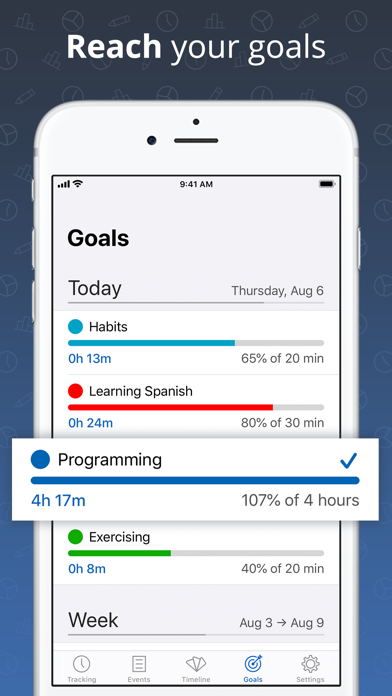
    Timelines Time Tracking screenshot 1
    Timelines Time Tracking screenshot 2
    Timelines Time Tracking screenshot 3
    Timelines Time Tracking screenshot 4
    Timelines Time Tracking screenshot 5

    Swipe to view more screenshots

    About Timelines Time Tracking

    Overview

    Timelines Time Tracking is a highly acclaimed productivity app designed to help users gain comprehensive insights into how they spend their time. Developed by Lukas Petr, the app offers a flexible yet powerful solution for recording daily activities, with the ultimate goal of fostering better time management and increased efficiency. Featured by Apple and praised by prominent tech publications like 9To5Mac and MacStories, Timelines empowers users to understand their routines, identify trends, and stay motivated to achieve time-based goals. The developer's personal motivation to improve his own time management shines through in the app's intuitive design and robust feature set.

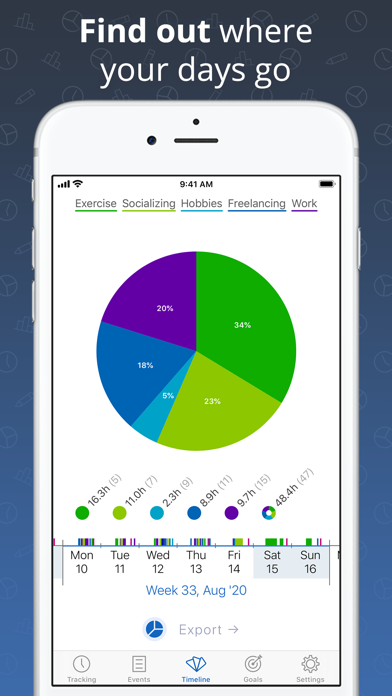
    The app's core strength lies in its seamless data entry and rich visualization tools. Users can effortlessly track any category they desire, controlling timers with a single tap, even directly from the lock screen using the Today widget. Beyond simple tracking, Timelines transforms raw data into actionable insights through interactive timelines, playful statistics with pie charts, and trend analyses via bar charts. The integration with Timelines Cloud ensures real-time synchronization across iPhone, iPad, and Apple Watch, providing an always up-to-date backup of vital time data. With features like goal setting, Siri Shortcuts for automation, and detailed export options, Timelines goes beyond basic time tracking to become a comprehensive personal productivity assistant.

    Key Features

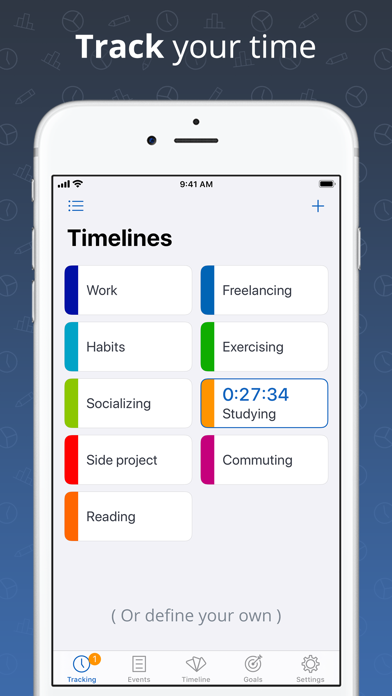
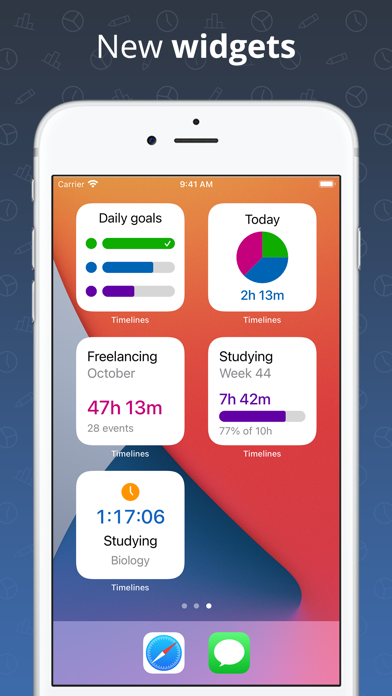
    • Quick Data Entry: Track any custom category with one-tap timer controls, including a grid mode and a lock screen Today widget for convenience.
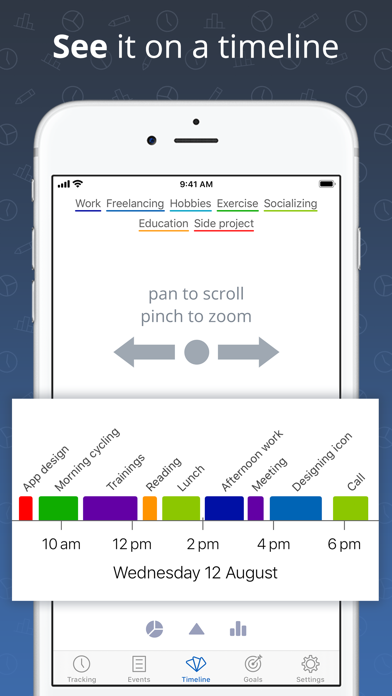
    • Interactive Visualizations: See how you spend your time with interactive timelines, pie charts, and bar chart trends, allowing for easy filtering and subcategory breakdowns.
    • Cross-Device Sync: Real-time synchronization and data backup across iPhone, iPad, and Apple Watch with Timelines Cloud, accessible via email or Apple ID.
    • Goal Setting: Define daily, weekly, and monthly goals, monitor progress, receive periodic reports, and get rewarded for achievements.
    • Automations & Siri Integration: Build workflows with Siri Shortcuts, use Siri to start/stop timers, and import health data from Apple Health.
    • Detailed Exports: Generate comprehensive PDF and CSV exports of your time data for further analysis or reporting.
    • Apple Watch App: Quick access through watch face complications, haptic feedback for timer control, and event naming via dictation.

    Who It's For

    Timelines Time Tracking is ideal for individuals who want to improve their personal productivity, understand their time allocation, and achieve better work-life balance. It's perfect for freelancers, students, remote workers, and anyone struggling with procrastination or feeling overwhelmed by a busy schedule. The app also caters to users who value detailed data visualization and cross-device synchronization within the Apple ecosystem, including Apple Watch enthusiasts looking for convenient time tracking on the go.

    Key Features

    track any category you want
    control timers with just 1 tap
    grid mode of timers
    track from lock screen with the today widget
    easily edit past events

    Similar Apps

    Hidden Gem
    Optimum Angle icon

    Optimum Angle

    Optimize Your Drive Shaft Performance with Optimum Angle! Introducing Optimum Angle, the ultimate tool for precision drive shaft angle measurement! Whether you're a mechanic, engineer, or automotive enthusiast, Optimum Angle is designed to simplify your workflow and enhance performance. With an intuitive interface and advanced algorithms, Optimum Angle lets you quickly and accurately measure and adjust drive shaft angles to perfection. Say goodbye to guesswork and hello to smoother, more efficient operations. Download Optimum Angle today and experience the power of precision in the palm of your hand!

    Technical
    Precise
    Niche
    productivity
    5
    Freemium
    Hidden Gem
    FlexList: A Productivity Tool icon

    FlexList: A Productivity Tool

    ## Overview FlexList is a comprehensive productivity application designed to empower users to manage their daily tasks and enhance their organizational skills. The app emphasizes user-centric customization, allowing individuals to tailor their daily routines to their personal preferences. By streamlining task creation, progress tracking, and prioritization, FlexList aims to transform the often-daunting process of task management into an accessible and engaging experience. Its intuitive interface and practical features make it an ideal tool for anyone looking to bring order and efficiency to their daily life. At its core, FlexList provides a robust framework for task management, moving beyond simple to-do lists to offer a more dynamic and interactive approach to productivity. The application focuses on visual feedback mechanisms, such as the unique Progress Ring, which motivates users by showing a clear, Filling representation of their accomplishments. This blend of functionality and user engagement ensures that keeping up with tasks remains an encouraging and rewarding endeavor, fostering a sense of achievement as users steadily work through their responsibilities. Whether for personal goals, professional duties, or academic assignments, FlexList simplifies the organizational journey. FlexList's design philosophy centers on making productivity effortless and personalized. It integrates essential features like task prioritization and due date assignments directly into the creation process, minimizing friction and maximizing user control. The app aims to reduce the common feeling of being overwhelmed by tasks by providing clear, actionable steps and visual indicators of progress. This thoughtful approach ensures that users can stay on top of their commitments with confidence, transforming their daily routine into a structured and productive experience. ## Key Features - **Easy Task Creation**: Quickly add new tasks with a simple tap, ensuring no idea or responsibility is forgotten. - **Progress Ring Visualizer**: Track your task completion visually with a customizable ring that fills as you check off items, offering a satisfying sense of accomplishment. - **Priority Ranking System**: Organize tasks by high, mid, and low priority levels, ensuring that the most important items always receive attention first. - **Customizable Progress Meter**: Choose specific colors and featured lists to be integrated into your personal progress meter for a tailored experience. - **Due Dates and Times**: Assign precise due dates and times to tasks, helping users manage time-sensitive responsibilities effectively. - **Intuitive Interface**: A user-friendly design that makes navigation and task management simple and efficient for all users. ## Who It's For FlexList is designed for individuals seeking to enhance their personal and professional organization, manage daily tasks effectively, and reduce the stress associated with an overwhelming to-do list. It's ideal for students, busy professionals, project managers, and anyone who benefits from structured planning and visual progress tracking. Those who appreciate a clean interface and motivational feedback will find FlexList particularly beneficial.

    Flexible
    Streamlined
    Empowering
    productivity
    5
    Free
    Hidden Gem
    Ammo Handler icon

    Ammo Handler

    Time-saving, accurate, and field portable solution for making sure you stay on the right side of transport regulations. SIMPLE NAVIGATION KEEPS YOU MOVING FORWARD Even your cherry LT can’t get lost working his way through this app. Forget flipping back and forth through hundreds of pages trying to sort through hazard classifications and nomenclature… Straightforward, no-frills design keeps it simple and to the point. ACCURACY YOU CAN RELY ON EVERY TIME Instantly sort everything in your convoy according to Federal requirements with a simple swipe! Logical algorithms eliminate human error and manage risk so you don’t have to. A DAY’S WORK DONE IN SECONDS Predictive search makes finding items EASY and FAST. A couple of swipes later, and your transport log is done. Store all your logs for repeat trips to the range, easily look up munitions for quick reference, load out with the necessary hazard placards* and more! *Feature currently in development. See an inaccuracy or something didn't sort right? We've spent a ton of time testing this product for accuracy, but if we missed something, let us know by emailing us at Support@alljackedupstudios.com and we'll correct it and push out an update ASAP! Thanks for downloading, and don't forget to rate us so we know how we're doing!

    Specialized
    Military-focused
    Highly-functional
    productivity
    5
    Freemium
    Hidden Gem
    Plaud: AI Notetaker icon

    Plaud: AI Notetaker

    ## Overview Plaud: AI Notetaker is an innovative productivity application designed to revolutionize how professionals capture, process, and utilize information. Leveraging advanced AI, Plaud aims to be the ultimate work companion, enhancing productivity and performance through sophisticated note-taking solutions. Trusted by over a million users globally, Plaud's mission is to amplify human intelligence by building next-generation infrastructure and interfaces that seamlessly capture and extract insights from spoken words, sounds, visuals, and thoughts. The Plaud ecosystem offers a comprehensive approach to note-taking, integrating specialized hardware devices with a powerful AI engine. Users can choose from three distinct AI note-taking devices: the Plaud Note, heralded as the world’s No.1 AI note taker; the Plaud NotePin, recognized as the most wearable AI note taker; and the Plaud Note Pro, touted as the most advanced AI note taker. These devices, combined with the Plaud app, ensure that whether you're in a meeting, interview, class, or creative session, you can remain fully present while Plaud diligently handles all your note-taking needs. Plaud Intelligence forms the core of this ecosystem, driving every experience from initial capture on a Plaud device to the retrieval and application of insights across the app, web, and desktop platforms. This AI engine facilitates multimodal input, generates highly accurate transcripts and contextual summaries, and integrates with leading large language models like GPT-5, Claude Sonnet 4, and Gemini 2.5 Pro. With features like multi-language transcription, custom vocabularies, automated summarization, and cross-platform synchronization with unlimited cloud storage, Plaud provides a robust and secure solution for managing information, all while adhering to enterprise-grade security and ISO 27001 compliance. ## Key Features - **Plaud Note Devices**: Integrate with specialized AI note-taking hardware (Plaud Note, Plaud NotePin, Plaud Note Pro). - **Multimodal Capture**: Capture ideas and information using various inputs, including audio and text. - **Audio Import & Transcription**: Record new audio or import existing files for AI transcription in 112 languages. - **Advanced AI Summarization**: Generate multiple contextual summaries from conversations using 10,000+ expert templates. - **Powered by Leading LLMs**: Utilizes GPT-5, Claude Sonnet 4, Gemini 2.5 Pro, and other top large language models. - **Plaud Intelligence Engine**: Provides reference-based answers, generates insights, and saves them as notes. - **AutoFlow Automation**: Automate transcription, summarization, and content delivery with customizable rules. - **Cross-Platform Sync**: Seamless synchronization across app, web, and desktop with unlimited cloud storage. - **Enterprise-Grade Security**: Built with ISO 27001 compliance for data safety, privacy, and control. ## Who It's For Plaud: AI Notetaker is designed for professionals across various fields who require efficient and accurate documentation of spoken information. This includes business professionals attending meetings, journalists conducting interviews, educators and students capturing lectures, and creative individuals brainstorming sessions. Anyone looking to enhance their productivity by offloading the task of manual note-taking to an intelligent AI assistant, while ensuring data security and comprehensive information management, will find Plaud an invaluable tool.

    Productive
    Professional
    Sophisticated
    productivity
    4.9
    Free