Back to Apps
    Focus To-Do: Focus Timer&Tasks icon

    Focus To-Do: Focus Timer&Tasks

    Hidden Gem

    Focus To-Do combines Pomodoro Timer with Task Management, it is a science-based app that will motivate you to stay focused and get things done. It b

    productivity
    4.8
    N/A
    iOS
    Free
    Honest Take

    + Users praise the app's comprehensive combination of Pomodoro timer, task management, intuitive UI, and flexible pricing.

    A recurring issue is the inability to custom sort tasks and difficulty in adjusting pomodoro lengths for individual tasks in some cases.

    This page contains affiliate links. Learn more

    Screenshots

    Focus To-Do: Focus Timer&Tasks screenshot 1
    Focus To-Do: Focus Timer&Tasks screenshot 2
    Focus To-Do: Focus Timer&Tasks screenshot 3
    Focus To-Do: Focus Timer&Tasks screenshot 4
    Focus To-Do: Focus Timer&Tasks screenshot 5

    Swipe to view more screenshots

    About Focus To-Do: Focus Timer&Tasks

    Focus To-Do combines Pomodoro Timer with Task Management, it is a science-based app that will motivate you to stay focused and get things done.

    It brings Pomodoro Technique and To Do List into one place, you can capture and organize tasks into your todo lists, start focus timer and focus on work & study, set reminders for important tasks and errands, check the time spent at work.

    It's the ultimate app for managing Tasks, Reminders, Lists, Calendar events, Grocery lists, checklist, helping you focus on work & study and tracking your working hours.

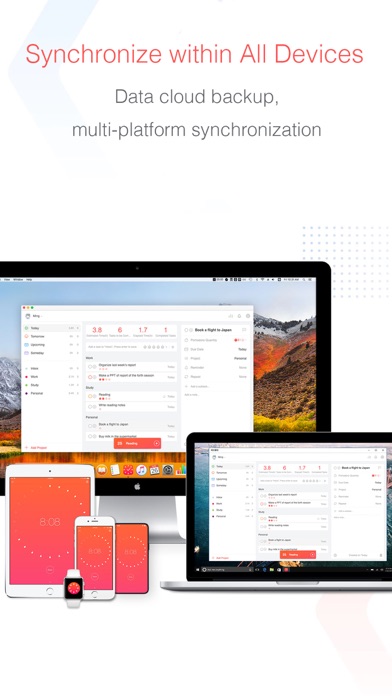
    Focus To-Do syncs between your phone and computer, so you can access your lists from anywhere.

    How it works: 1. Pick a task you need to accomplish. 2. Set a timer for 25 minutes, keep focused and start working. 3. When the pomodoro timer rings, take a 5 minute break.

    Key Features:

    • Pomodoro Timer:Stay focused and get more things done. Pause and resume Pomodoro Customizable pomodoro/breaks lengths Notification before the end of a Pomodoro Support for short and long breaks Skip a break after the end of a Pomodoro Continuous Mode

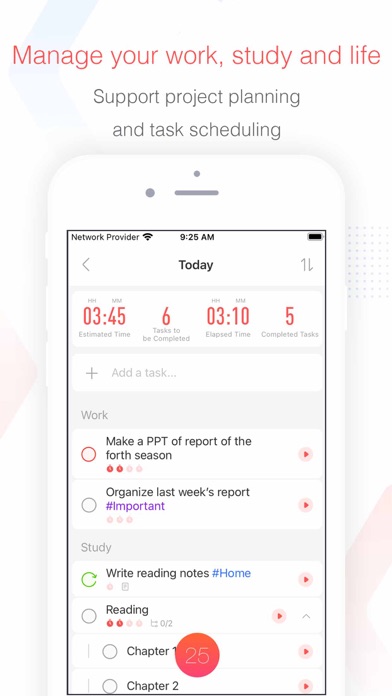
    • Tasks Management: Task Organizer, Schedule Planner, Reminder, Habit Tracker, Time Tracker Tasks and projects: Organise your day with Focus To-Do and complete your to do, study, work, homework or housework you need to get done. Recurring tasks: Build lasting habits with powerful recurring due dates like "Every Monday". Reminders: Setting a Reminder ensures you never forget important things ever again, you can set up recurring due dates to remind you each and every time. Sub-tasks: Break down your task into smaller, actionable items or add a checklist . Task Priority: Highlight your day’s most important To-Do with color-coded priority levels. Estimated Pomodoro Number: Estimate the workload or set a goal. Note: Record more detailed about the task.

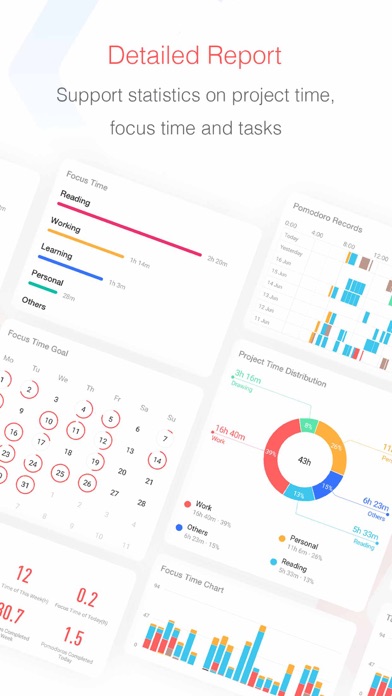
    • Report: Detailed statistics of your time distribution, tasks completed. Support the calculation of the total time of Focus Time. Gantt Chart of the Focus Time. Statistics on completed To Do. Statistics on time distribution of project. Trend chart of the completed To Do and the focus time.

    • All-Platform synchronization: View and manage your goals wherever you are for better goal achieving. Support seamless synchronization within iPhone、Mac、iPad、Apple Watch and other major platforms.

    • Various Reminding: Focus Timer finished alarm, vibration reminding. Various white noise to help you focus on work & study.

    • Daily/Weekly/Monthly Report View all of your tracked time in a calendar view.

    • Support prevention of screen lock: Check the pomodoro time left by keeping the screen on.

    Contact Us: focustodo@163.com, reply within 24 hours. Website: http://www.focustodo.cn Pomodoro ™ and Pomodoro Technique ® are registered trademarks of Francesco Cirillo. This app is not affiliated with Francesco Cirillo.

    Users have been focused on our app for 200 million hours, join us and we help you to be focused and increase your productivity, reduce procrastination and anxiety.

    Key Features

    Pomodoro Timer:Stay focused and get more things done.
    Tasks Management: Task Organizer, Schedule Planner, Reminder, Habit Tracker, Time Tracker
    Report: Detailed statistics of your time distribution, tasks completed.
    Various Reminding:
    Daily/Weekly/Monthly Report

    Similar Apps

    Hidden Gem
    Optimum Angle icon

    Optimum Angle

    Optimize Your Drive Shaft Performance with Optimum Angle! Introducing Optimum Angle, the ultimate tool for precision drive shaft angle measurement! Whether you're a mechanic, engineer, or automotive enthusiast, Optimum Angle is designed to simplify your workflow and enhance performance. With an intuitive interface and advanced algorithms, Optimum Angle lets you quickly and accurately measure and adjust drive shaft angles to perfection. Say goodbye to guesswork and hello to smoother, more efficient operations. Download Optimum Angle today and experience the power of precision in the palm of your hand!

    Technical
    Precise
    Niche
    productivity
    5
    Freemium
    Hidden Gem
    FlexList: A Productivity Tool icon

    FlexList: A Productivity Tool

    ## Overview FlexList is a comprehensive productivity application designed to empower users to manage their daily tasks and enhance their organizational skills. The app emphasizes user-centric customization, allowing individuals to tailor their daily routines to their personal preferences. By streamlining task creation, progress tracking, and prioritization, FlexList aims to transform the often-daunting process of task management into an accessible and engaging experience. Its intuitive interface and practical features make it an ideal tool for anyone looking to bring order and efficiency to their daily life. At its core, FlexList provides a robust framework for task management, moving beyond simple to-do lists to offer a more dynamic and interactive approach to productivity. The application focuses on visual feedback mechanisms, such as the unique Progress Ring, which motivates users by showing a clear, Filling representation of their accomplishments. This blend of functionality and user engagement ensures that keeping up with tasks remains an encouraging and rewarding endeavor, fostering a sense of achievement as users steadily work through their responsibilities. Whether for personal goals, professional duties, or academic assignments, FlexList simplifies the organizational journey. FlexList's design philosophy centers on making productivity effortless and personalized. It integrates essential features like task prioritization and due date assignments directly into the creation process, minimizing friction and maximizing user control. The app aims to reduce the common feeling of being overwhelmed by tasks by providing clear, actionable steps and visual indicators of progress. This thoughtful approach ensures that users can stay on top of their commitments with confidence, transforming their daily routine into a structured and productive experience. ## Key Features - **Easy Task Creation**: Quickly add new tasks with a simple tap, ensuring no idea or responsibility is forgotten. - **Progress Ring Visualizer**: Track your task completion visually with a customizable ring that fills as you check off items, offering a satisfying sense of accomplishment. - **Priority Ranking System**: Organize tasks by high, mid, and low priority levels, ensuring that the most important items always receive attention first. - **Customizable Progress Meter**: Choose specific colors and featured lists to be integrated into your personal progress meter for a tailored experience. - **Due Dates and Times**: Assign precise due dates and times to tasks, helping users manage time-sensitive responsibilities effectively. - **Intuitive Interface**: A user-friendly design that makes navigation and task management simple and efficient for all users. ## Who It's For FlexList is designed for individuals seeking to enhance their personal and professional organization, manage daily tasks effectively, and reduce the stress associated with an overwhelming to-do list. It's ideal for students, busy professionals, project managers, and anyone who benefits from structured planning and visual progress tracking. Those who appreciate a clean interface and motivational feedback will find FlexList particularly beneficial.

    Flexible
    Streamlined
    Empowering
    productivity
    5
    Free
    Hidden Gem
    Ammo Handler icon

    Ammo Handler

    Time-saving, accurate, and field portable solution for making sure you stay on the right side of transport regulations. SIMPLE NAVIGATION KEEPS YOU MOVING FORWARD Even your cherry LT can’t get lost working his way through this app. Forget flipping back and forth through hundreds of pages trying to sort through hazard classifications and nomenclature… Straightforward, no-frills design keeps it simple and to the point. ACCURACY YOU CAN RELY ON EVERY TIME Instantly sort everything in your convoy according to Federal requirements with a simple swipe! Logical algorithms eliminate human error and manage risk so you don’t have to. A DAY’S WORK DONE IN SECONDS Predictive search makes finding items EASY and FAST. A couple of swipes later, and your transport log is done. Store all your logs for repeat trips to the range, easily look up munitions for quick reference, load out with the necessary hazard placards* and more! *Feature currently in development. See an inaccuracy or something didn't sort right? We've spent a ton of time testing this product for accuracy, but if we missed something, let us know by emailing us at Support@alljackedupstudios.com and we'll correct it and push out an update ASAP! Thanks for downloading, and don't forget to rate us so we know how we're doing!

    Specialized
    Military-focused
    Highly-functional
    productivity
    5
    Freemium
    Hidden Gem
    Scanner App: Genius Scan icon

    Scanner App: Genius Scan

    ## Overview Genius Scan is a highly-rated mobile application that transforms your smartphone into a portable document scanner. Designed for both individuals and small businesses, this productivity tool allows users to quickly digitize paper documents, receipts, whiteboards, and more, converting them into crisp, multi-page PDF files. Its intuitive design and robust automatic processing, including intelligent document detection, background removal, and distortion correction, ensure high-quality, professional-looking scans with minimal effort. Whether you're on the go and need to send an important document or decluttering your office, Genius Scan provides a streamlined solution. The app boasts impressive accolades, including being an Apple App of the Week and trusted by over 20 million users and thousands of small businesses. Its core functionality revolves around smart scanning capabilities like shadow removal and defect cleanup, complemented by filters to enhance readability. Beyond scanning, Genius Scan offers powerful features for PDF creation and editing, document organization with tagging and search, and secure export options to various cloud services. The ability to batch scan dozens of pages in seconds further boosts its efficiency, making it an indispensable tool for managing paperwork digitally. For users requiring advanced functionalities, Genius Scan offers a premium plan that unlocks features such as document merging, Face ID locking, PDF password encryption, smart renaming templates, multi-device sync via Genius Cloud, automatic background auto-export, and comprehensive OCR for text extraction and searchable PDF creation. This tiered approach ensures that both casual users and professionals with demanding documentation needs can find value in the app. ## Key Features - **Smart Scanning**: Automatic document detection, background removal, distortion correction, and defect cleanup for clear scans. - **Batch Scanning**: Digitize multiple pages rapidly in a single session. - **PDF Creation & Editing**: Create multi-page PDFs, merge and split documents, and import photos/PDFs. - **Document Organization**: Tag documents, search content/metadata, and utilize smart renaming for easy management. - **Security & Privacy**: On-device processing, with premium options for Face ID locking and PDF password encryption. - **Export Options**: Share via email or integrate with numerous cloud services like Dropbox, Google Drive, and OneDrive. - **OCR (Premium)**: Extract text from scans, create searchable PDFs, and scan business cards to create contacts. ## Who It's For Genius Scan is ideal for anyone who needs to digitize documents quickly and efficiently. This includes students for scanning notes and assignments, professionals like real estate agents and lawyers for digitizing contracts, freelancers for managing invoices and receipts, and small business owners looking to go paperless. Essentially, anyone seeking to reduce physical clutter, create digital archives, or facilitate document sharing and organization will find Genius Scan to be an invaluable productivity tool.

    Efficient
    Professional
    Reliable
    productivity
    4.9
    Free