
Back to Apps
    Recipe Keeper icon

    Recipe Keeper

    Hidden Gem

    Organize, plan, and cook with ease using Recipe Keeper. Import, scan, and store recipes, create meal plans, and generate smart shopping lists. Your ultimat

    food
    4.8
    N/A
    iOS
    Android
    Free
    Honest Take

    + Users praise the app's efficiency in organizing recipes, creating meal plans, and generating grocery lists, highlighting its excellent import accuracy, even from handwritten notes.

    A recurring problem involves ingredients failing to categorize correctly or maintain their pairings within the app, causing inconvenience for users with large recipe collections.

    This page contains affiliate links. Learn more

    Screenshots

    Recipe Keeper screenshot 1
    Recipe Keeper screenshot 2
    Recipe Keeper screenshot 3
    Recipe Keeper screenshot 4
    Recipe Keeper screenshot 5

    Swipe to view more screenshots

    About Recipe Keeper

    Overview

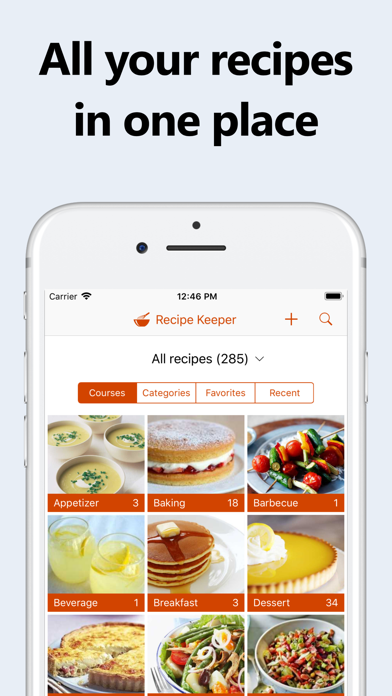
    Recipe Keeper is a robust and intuitive mobile application designed to be the ultimate culinary companion, organizing all your recipes, simplifying meal planning, and streamlining grocery shopping. At its core, the app acts as a comprehensive digital recipe box, allowing users to effortlessly store, categorize, and access their favorite recipes from a multitude of sources. Whether you're a seasoned chef with a cherished collection of family recipes, a budding cook exploring new culinary horizons, or simply looking to make healthy meal choices, Recipe Keeper provides the tools to manage your kitchen efficiently. It aims to eliminate kitchen chaos by centralizing recipe management and offering intelligent features for meal preparation.

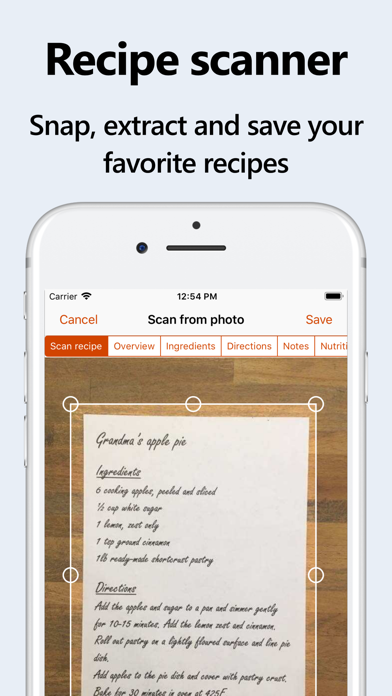
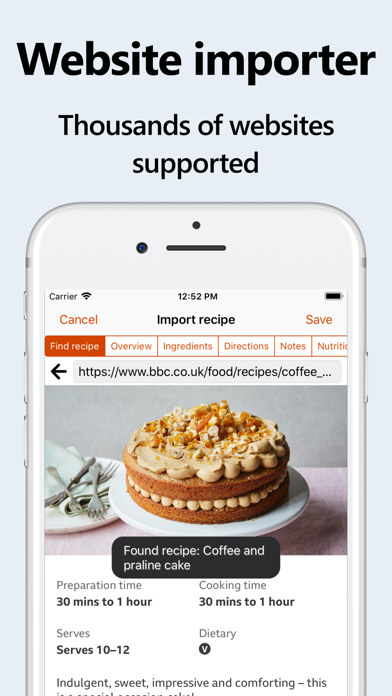
    Beyond basic recipe storage, Recipe Keeper excels in its ability to import recipes from various mediums. Users can quickly add recipes by typing them in, copying and pasting from existing documents, or directly importing from hundreds of popular recipe websites. A standout feature is its OCR technology, which allows for scanning recipes from physical cookbooks, magazines, or even handwritten notes, converting them into editable text. The app also empowers users with advanced organizational tools like customizable collections, courses, and categories, along with options to add nutritional information, rate recipes, and flag favorites. Its cross-device availability ensures your culinary library is always at your fingertips, whether you’re planning meals on your tablet or cooking in the kitchen with your phone.

    Key Features

    • Recipe Importing: Easily add recipes by typing, pasting, or importing from hundreds of popular recipe websites.
    • OCR Scanning: Digitize recipes from cookbooks, magazines, and handwritten notes using your device's camera.
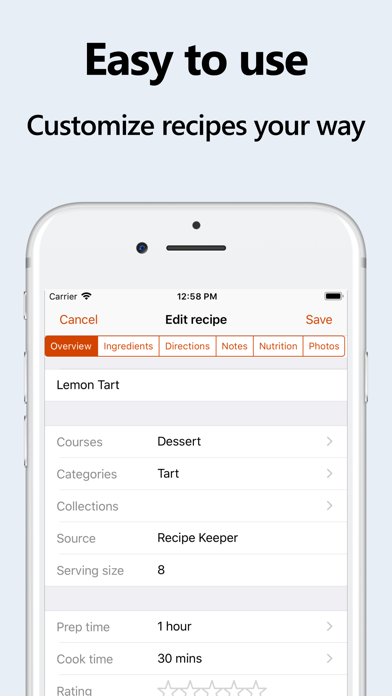
    • Customizable Organization: Categorize recipes with personalized collections, courses, and categories, plus add photos and ratings.
    • Nutritional Information & Search: Include nutrition facts and search recipes based on specific nutritional amounts.
    • Meal Planning & Shopping Lists: Plan meals weekly or monthly, generate random meal plans, and add ingredients directly to a smart shopping list.
    • Cooking Assistance: Check off ingredients as you cook and highlight the current step for an organized cooking experience.
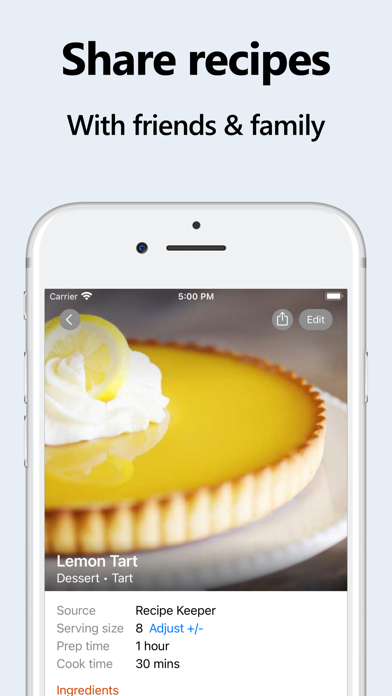
    • Recipe Sharing & Cookbooks: Share recipes via email or social media, create shared family collections, and generate printable PDF cookbooks.
    • Serving Size Adjustment: Automatically recalculate ingredient quantities when scaling recipe serving sizes up or down.

    Who It's For

    Recipe Keeper is ideal for anyone looking to bring order and efficiency to their kitchen. It's perfect for home cooks who have accumulated a vast collection of recipes scattered across different platforms, cookbooks, or handwritten notes and wish to consolidate them digitally. Families or individuals who struggle with meal planning and grocery list creation will find its integrated tools invaluable. Additionally, it caters to users interested in nutritional tracking, those who frequently import recipes from the web, and anyone who enjoys sharing their culinary creations with friends and family. From beginners to experienced chefs, Recipe Keeper streamlines the entire cooking process, making it enjoyable and stress-free.

    Key Features

    Choose from 25 different color schemes, light & dark modes
    Format recipes using bold and italics
    Customizable recipe collections, courses and categories
    Add nutrition information and search for recipes by nutritional amounts
    Check off ingredients while cooking, highlight the current direction

    Similar Apps

    Hidden Gem
    Recipe - Cooking,Meal Planner icon

    Recipe - Cooking,Meal Planner

    ## Overview Recipe - Cooking, Meal Planner is a comprehensive mobile application designed to transform the way users approach meal preparation. Boasting an impressive library of over 70 global recipes, ranging from Italian pasta dishes to intricate Japanese sushi, the app caters to a diverse array of culinary preferences and skill levels. Its core functionality revolves around simplifying the cooking process, offering more than just a collection of recipes; it provides an integrated system for meal planning and grocery shopping. The app's intuitive interface guides users through each recipe with clear, step-by-step instructions, ensuring even novice cooks can achieve delicious results. Beyond simply presenting ingredients and methods, it intelligently generates smart shopping lists based on selected recipes, streamlining the often-tedious task of grocery planning. This focus on user experience and practical utility makes Recipe an invaluable tool for anyone looking to organize their cooking, explore new cuisines, and minimize food waste. ## Key Features - **70+ Global Recipes**: Explore a diverse culinary landscape with dishes spanning various international cuisines. - **Step-by-Step Cooking Guides**: Follow clear, easy-to-understand instructions for every stage of the cooking process. - **Smart Shopping Lists**: Automatically generate grocery lists based on your chosen recipes, simplifying meal prep. - **Difficulty Filters**: Customize your recipe search by filtering options based on cooking skill level. - **Adjustable Servings**: Easily scale recipe ingredient quantities to match the number of people you're cooking for. - **Save Favorites**: Bookmark and organize your most loved recipes for quick access in the future. - **Multilingual Support**: Access the app and its features in multiple languages, making it globally accessible. ## Who It's For Recipe - Cooking, Meal Planner is ideal for individuals and families looking to streamline their meal preparation and grocery shopping. It caters to busy professionals seeking efficient ways to plan meals, culinary enthusiasts eager to explore new international dishes, and beginner cooks who benefit from clear, guided instructions. Anyone aiming to reduce food waste, organize their kitchen, and elevate their home cooking experience will find this app incredibly useful.

    Unverified
    Functional
    Undeveloped
    food
    5
    Free
    Hidden Gem
    Daily Meal Planner icon

    Daily Meal Planner

    ## Overview Daily Meal Planner is a streamlined and efficient mobile application designed to simplify the often-daunting task of daily meal planning. This app focuses on core functionalities, making it incredibly user-friendly for anyone looking to organize their culinary routine. From establishing a daily menu to viewing an entire month's worth of meals at a glance, “Daily Meal Planner” aims to take the stress out of deciding “what’s for dinner?” each day. The app stands out by offering a clear, calendar-based interface that not only aids in individual meal preparation but also helps users manage nutritional balance, track health goals, plan grocery shopping, and even save money by preventing impulsive takeout orders. Its intuitive design allows users to quickly input dish names, categorize them (e.g., main dishes, side dishes), and then easily re-select previously entered meals through a keyword search or list, significantly cutting down on planning time. Beyond basic meal scheduling, Daily Meal Planner includes practical features like recipe URL and memo management for each dish, ensuring users can always access cooking instructions. The customizable theme colors add a personal touch, while data synchronization across multiple devices and family members fosters collaborative meal planning. Data backup capabilities offer peace of mind, making it a reliable tool for long-term meal management. ## Key Features - **Daily Menu Creation**: Easily plan and register meals for each day with simple input and selection. - **Monthly Calendar View**: Instantly check and review your entire month's menu at a glance for better planning. - **Meal Categorization**: Organize dishes into categories like main meals, main dishes, and side dishes for structured planning. - **Breakfast, Lunch, Dinner Registration**: Assign specific meals to respective time slots for comprehensive daily planning. - **Recipe Management**: Store recipe URLs and notes for dishes, making cooking instructions easily accessible. - **Data Synchronization**: Sync meal plans across multiple devices and share with family members. - **Customizable Theme Colors**: Personalize the app's appearance with selectable theme colors. - **Data Backup**: Securely save your meal planning data for future reference and recovery. ## Who It's For Daily Meal Planner is ideal for individuals, couples, and families looking to bring structure and efficiency to their daily and monthly meal planning. It's particularly beneficial for those who want to improve their nutritional balance, manage health goals, streamline grocery shopping, and save time and money on food preparation. Busy professionals, parents, and anyone striving for a more organized approach to home cooking will find this app incredibly useful.

    Organized
    Streamlined
    Customizable
    food
    4.9
    Free
    Hidden Gem
    Tasty: Recipes, Cooking Videos icon

    Tasty: Recipes, Cooking Videos

    ## Overview "Tasty: Recipes, Cooking Videos" revolutionizes the home cooking experience, serving as a comprehensive digital culinary guide from the renowned Tasty brand. This app leverages an extensive library of over 10,000 recipes, each accompanied by engaging video instructions and detailed step-by-step cooking modes, making complex dishes accessible to cooks of all skill levels. Beyond just recipes, the app fosters exploration through personalized recommendations, adapting to seasonal ingredients, time of day, and special occasions, ensuring users always find something new and exciting to prepare. What sets Tasty apart is its blend of innovative technology and community engagement. The integration of "AI Botatouille," powered by ChatGPT API, acts as a personal culinary assistant, intelligently suggesting recipes based on individual preferences and available ingredients. Furthermore, the app simplifies the cooking journey from inspiration to plate with its "Shoppable Recipe Integration," allowing users to conveniently order groceries via Walmart for home delivery or pickup. This seamless workflow, combined with a vibrant community feature for sharing creations and tips, positions Tasty as an indispensable tool for anyone looking to enhance their culinary skills and discover a world of flavors. ## Key Features - **10,000+ Recipes with Videos**: Access a vast collection of delicious recipes, each with video guides and step-by-step instructions. - **AI Botatouille**: Utilize an AI assistant to discover recipes tailored to your preferences and available ingredients. - **Shoppable Recipe Integration**: Easily shop for recipe ingredients and get groceries delivered or picked up via Walmart. - **Tasty Community**: Connect with other food enthusiasts, share your culinary creations, and gain inspiration. - **Personalized Cookbooks**: Save and organize your favorite recipes into custom collections for easy access. - **Ingredient Search**: Find recipes by inputting just a few ingredients you already have on hand. - **Adjustable Serving Sizes**: Modify recipe serving sizes with both US and metric measurements. - **Connect with Creators**: Interact with and learn from your favorite Tasty Creators. ## Who It's For The Tasty app is ideal for home cooks of all experience levels, from beginners seeking guided instructions to seasoned chefs looking for new inspiration. It caters to individuals who enjoy exploring diverse cuisines, wish to streamline their meal planning and grocery shopping, and appreciate engaging with a community of fellow food lovers. Anyone looking for a comprehensive, interactive, and convenient cooking companion will find "Tasty: Recipes, Cooking Videos" an invaluable resource.

    Approachable
    Engaging
    Supportive
    food
    4.9
    Free
    Hidden Gem
    Beli icon

    Beli

    Beli helps you track, share, and discover the world’s best restaurants • Keep organized ranked lists and maps of everywhere you've been and want to try • See where your friends are eating and what they love and hate • Get personalized recommendations you are sure to love Select Features • Scroll your newsfeed to see the latest spots your friends have tried • Add tags to help organize and filter your lists • Add notes and favorite dishes • View your “Taste Profile” to learn about what you love most • Check out your “Match Score” with your friends to see who really shares your tastes

    Social
    Curated
    Gamified
    food
    4.9
    Free